Power Management
You can manage your server's power state through the control panel.
Available Actions
| Action | Description |
|---|---|
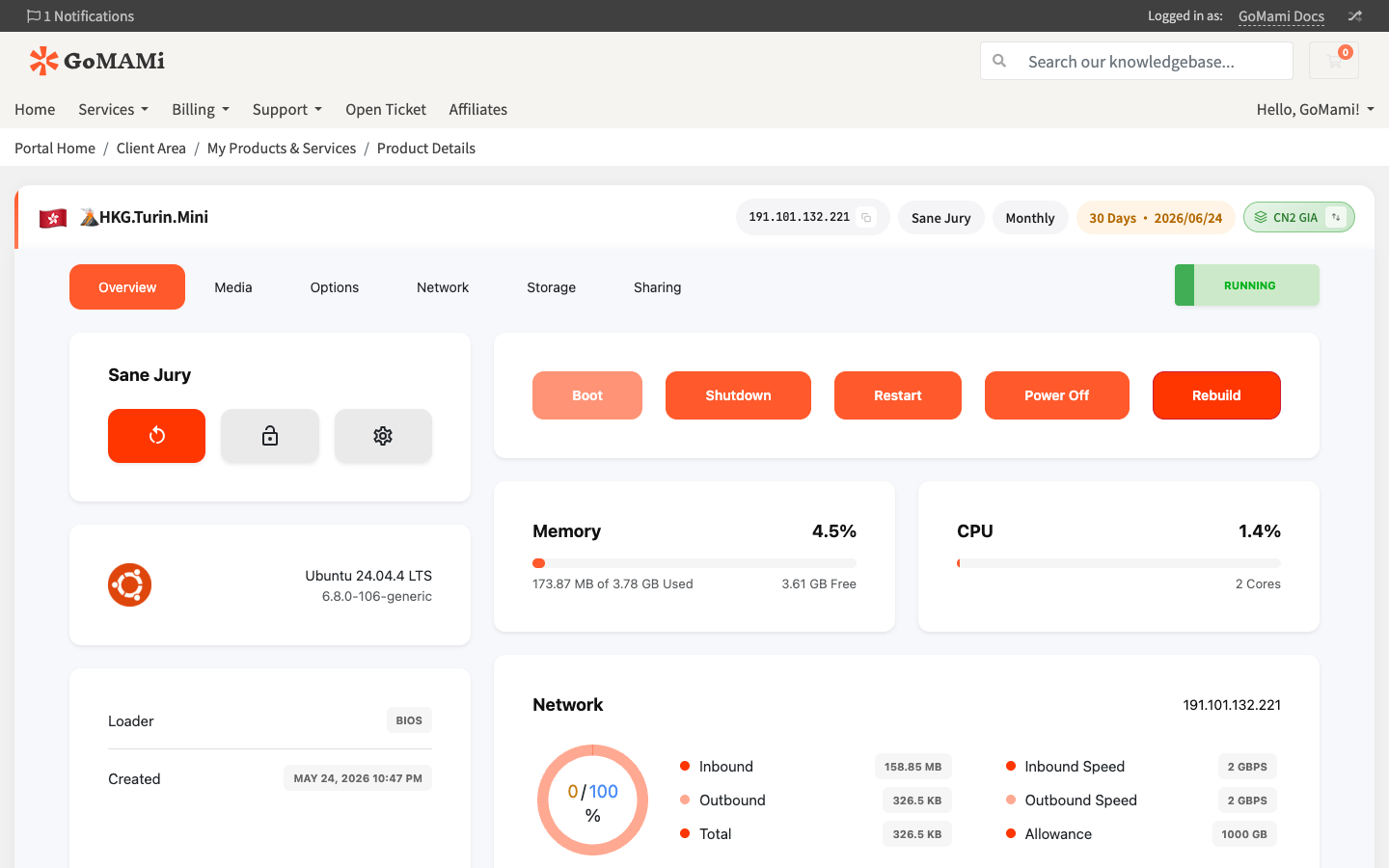
| Boot | Start a stopped server |
| Restart | Gracefully restart (sends shutdown signal, then starts) |
| Shutdown | Graceful shutdown (sends shutdown signal to OS) |
| Power Off | Force power off (equivalent to pulling the plug, may cause data loss) |
Steps
- Log in to GoMami, go to Services > My Services
- Click the target server
- Power action buttons are visible at the top of the control panel (Boot / Shutdown / Restart / Power Off)
- Click the desired action button and confirm in the dialog
caution
Power Off (force shutdown) immediately cuts power and may corrupt data being written. Use Shutdown (graceful) whenever possible.
Via API
You can also perform power actions via API:
# Restart server
curl -X POST https://cp.gomami.io/api/server/{id}/restart \
  -H "Authorization: Bearer <your_api_token>"

# Boot server
curl -X POST https://cp.gomami.io/api/server/{id}/boot \
  -H "Authorization: Bearer <your_api_token>"

# Graceful shutdown
curl -X POST https://cp.gomami.io/api/server/{id}/shutdown \
  -H "Authorization: Bearer <your_api_token>"