IP Address Management
Each GoMami VPS instance is assigned a dedicated IPv4 address. You can view and manage IP address information in the control panel.
Viewing Your IP Address
- Log in to GoMami, go to the server control panel
- Click the Network tab
- View complete network information in the Primary Network and IPv4 Addresses sections
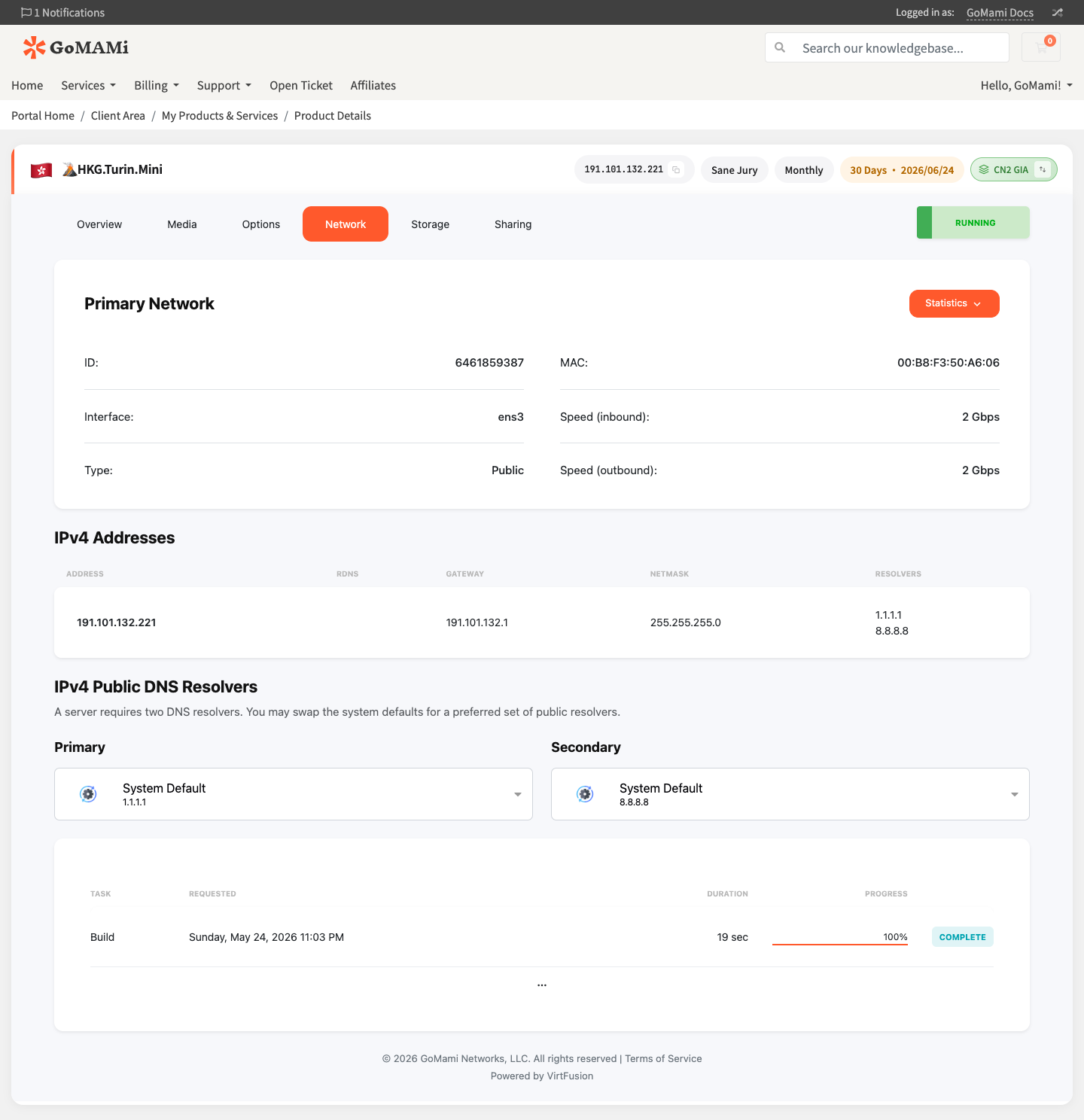
Network Information
The Network tab displays:
| Field | Description |
|---|---|
| Interface | Network interface name (e.g., ens3) |
| Type | Network type (Public) |
| MAC | MAC address |
| Speed (inbound/outbound) | Inbound/outbound bandwidth speed |
| IPv4 Address | Server's public IPv4 address |
| Gateway | Default gateway address |
| Netmask | Subnet mask |
| Resolvers | DNS resolver addresses |
Reverse DNS (rDNS)
You can set reverse DNS records directly in the Network tab by clicking the RDNS column in the IPv4 address table.
Before setting rDNS, make sure you've configured the corresponding forward DNS record with your DNS provider.
DNS Resolvers
In the IPv4 Public DNS Resolvers section, you can customize Primary and Secondary DNS resolvers. The defaults are system-provided resolvers (1.1.1.1 and 8.8.8.8).
Network Configuration
Network is automatically configured after deployment — usually no manual setup is needed. If you need manual configuration (e.g., after installing a custom OS):
Ubuntu / Debian (Netplan)
# /etc/netplan/01-netcfg.yaml
network:
  version: 2
  ethernets:
    eth0:
      addresses:
        - your_ip/24
      gateway4: gateway_ip
      nameservers:
        addresses:
          - 8.8.8.8
          - 1.1.1.1
# Apply configuration
netplan apply
CentOS / AlmaLinux (NetworkManager)
# Configure with nmcli
nmcli con mod eth0 ipv4.addresses "your_ip/24"
nmcli con mod eth0 ipv4.gateway "gateway_ip"
nmcli con mod eth0 ipv4.dns "8.8.8.8,1.1.1.1"
nmcli con mod eth0 ipv4.method manual
nmcli con up eth0
Incorrect network configuration may cause the server to become unreachable. Before making changes, ensure you can access the server via VNC console as a fallback.
Reverse DNS (rDNS)
If you need to set up reverse DNS records (commonly used for mail servers), contact the support team via the ticket system.
Next Steps
- DDoS Protection — Learn about network protection
- Locations & Network — View node network details